
csv_split.sh
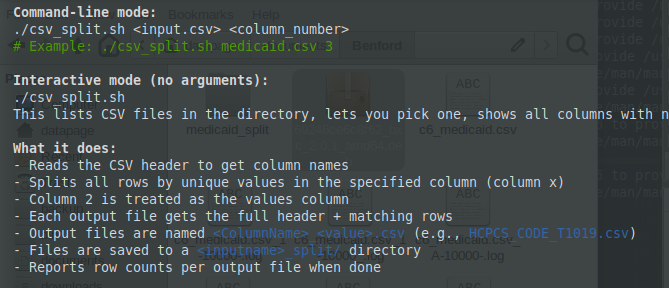
This lists CSV files in the directory, lets you pick one, shows all columns with numbers, and prompts for the split column.
What it does:
- Reads the CSV header to get column names
- Splits all rows by unique values in the specified column (column x)
- Column 2 is treated as the values column
- Each output file gets the full header + matching rows
- Output files are named <ColumnName>_<value>.csv (e.g., HCPCS_CODE_T1019.csv)
- Files are saved to a <inputname>_split/ directory
- Reports row counts per output file when done
Command-line mode:
./csv_split.sh <input.csv> <column_number>
# Example: ./csv_split.sh medicaid.csv 3
SH
csv_split.sh
#!/usr/bin/env bash
#
# csv_split.sh — Split a CSV file into separate files based on unique values
#                in a specified column. Each output file contains rows sharing
#                the same value in that column, with column 2 as the values column.
#
# Output filenames:  <column_header>_<value>.csv
#
# Usage (command-line):
#   ./csv_split.sh <input.csv> <column_number>
#   ./csv_split.sh -d <input.csv> <column_number>   # each file in its own subfolder
#
# Usage (interactive):
#   ./csv_split.sh
#
# Flags:
#   -d    Place each output CSV in its own subfolder named after the file prefix
#

set -euo pipefail

# ── helpers ──────────────────────────────────────────────────────────────────

die() { echo "ERROR: $*" >&2; exit 1; }

show_columns() {
    local file="$1"
    echo ""
    echo "Available columns in '$file':"
    echo "─────────────────────────────────────────"
    # Read header and print each column with its number
    IFS=',' read -r -a headers < "$file"
    for i in "${!headers[@]}"; do
        printf "  %3d : %s\n" "$((i + 1))" "${headers[$i]}"
    done
    echo "─────────────────────────────────────────"
    echo ""
}

split_csv() {
    local input_file="$1"
    local split_col="$2"        # 1-based column number to split on
    local use_subdirs="$3"       # "yes" to place each file in its own subfolder
    local values_col=2           # column 2 holds the values

    [[ -f "$input_file" ]] || die "File not found: $input_file"

    # Read the header
    local header
    header=$(head -n 1 "$input_file")
    IFS=',' read -r -a header_arr <<< "$header"

    local num_cols=${#header_arr[@]}

    # Validate column number
    if (( split_col < 1 || split_col > num_cols )); then
        die "Column $split_col is out of range (1–$num_cols)."
    fi

    local col_name="${header_arr[$((split_col - 1))]}"
    # Strip any trailing carriage return from the column name
    col_name="${col_name%$'\r'}"

    local val_col_name="${header_arr[$((values_col - 1))]}"
    val_col_name="${val_col_name%$'\r'}"

    # Create output directory
    local out_dir="${input_file%.csv}_split"
    mkdir -p "$out_dir"

    echo ""
    echo "Splitting '$input_file'"
    echo "  Split column : $split_col ($col_name)"
    echo "  Values column: $values_col ($val_col_name)"
    echo "  Output dir   : $out_dir/"
    [[ "$use_subdirs" == "yes" ]] && echo "  Subfolders   : enabled (-d)"
    echo ""

    # Use awk to split the file
    # awk is 1-based for fields, which matches our convention
    awk -F',' -v col="$split_col" \
              -v vcol="$values_col" \
              -v col_name="$col_name" \
              -v val_col_name="$val_col_name" \
              -v out_dir="$out_dir" \
              -v use_subdirs="$use_subdirs" \
    'BEGIN { OFS="," }
    NR == 1 {
        # Store the full header for output files
        full_header = $0
        # Build a two-column header: split_col_name, values_col_name
        mini_header = col_name "," val_col_name
        next
    }
    {
        # Get the value in the split column
        val = $col
        # Strip carriage returns
        gsub(/\r/, "", val)
        # Sanitise the value for use as a filename
        safe_val = val
        gsub(/[^A-Za-z0-9._-]/, "_", safe_val)

        # Build the filename prefix
        prefix = col_name "_" safe_val

        if (use_subdirs == "yes") {
            # Place each CSV in its own subfolder named after the prefix
            subdir = out_dir "/" prefix
            outfile = subdir "/" prefix ".csv"
        } else {
            outfile = out_dir "/" prefix ".csv"
        }

        # Write header if this is a new file
        if (!(val in seen)) {
            seen[val] = 1
            if (use_subdirs == "yes") {
                system("mkdir -p \"" subdir "\"")
            }
            print full_header > outfile
            count++
        }

        # Write the data row
        print $0 >> outfile
    }
    END {
        printf "  Created %d files for %d unique values in column \"%s\".\n", count, count, col_name
    }' "$input_file"

    echo ""
    echo "Output files:"
    find "$out_dir" -name '*.csv' -type f | sort | while read -r f; do
        rows=$(( $(wc -l < "$f") - 1 ))
        # Show path relative to out_dir
        rel="${f#"$out_dir"/}"
        printf "  %-60s  (%d rows)\n" "$rel" "$rows"
    done
    echo ""
    echo "Done."
}

# ── main ─────────────────────────────────────────────────────────────────────

USE_SUBDIRS="no"

# Parse flags
while getopts ":d" opt; do
    case $opt in
        d) USE_SUBDIRS="yes" ;;
        *) die "Unknown option: -$OPTARG" ;;
    esac
done
shift $((OPTIND - 1))

if [[ $# -ge 2 ]]; then
    # ── Command-line mode ────────────────────────────────────────────────
    INPUT_FILE="$1"
    SPLIT_COL="$2"

    [[ "$SPLIT_COL" =~ ^[0-9]+$ ]] || die "Column number must be a positive integer."

    split_csv "$INPUT_FILE" "$SPLIT_COL" "$USE_SUBDIRS"

elif [[ $# -eq 0 ]]; then
    # ── Interactive mode ─────────────────────────────────────────────────
    echo "╔═══════════════════════════════════════╗"
    echo "║      CSV Splitter — Interactive       ║"
    echo "╚═══════════════════════════════════════╝"
    echo ""

    # List CSV files in the current directory
    csv_files=( *.csv )
    if [[ ${#csv_files[@]} -eq 0 || "${csv_files[0]}" == "*.csv" ]]; then
        die "No CSV files found in the current directory."
    fi

    echo "CSV files in current directory:"
    for i in "${!csv_files[@]}"; do
        printf "  %3d : %s\n" "$((i + 1))" "${csv_files[$i]}"
    done
    echo ""

    read -rp "Select a file (number or filename): " file_choice

    # Determine if they entered a number or a filename
    if [[ "$file_choice" =~ ^[0-9]+$ ]]; then
        idx=$((file_choice - 1))
        if (( idx < 0 || idx >= ${#csv_files[@]} )); then
            die "Invalid selection."
        fi
        INPUT_FILE="${csv_files[$idx]}"
    else
        INPUT_FILE="$file_choice"
    fi

    [[ -f "$INPUT_FILE" ]] || die "File not found: $INPUT_FILE"

    show_columns "$INPUT_FILE"

    read -rp "Enter the column number to split on: " SPLIT_COL

    [[ "$SPLIT_COL" =~ ^[0-9]+$ ]] || die "Column number must be a positive integer."

    # Ask about subfolder mode if -d wasn't already set on the command line
    if [[ "$USE_SUBDIRS" != "yes" ]]; then
        read -rp "Place each CSV in its own subfolder? (y/N): " subdir_choice
        [[ "$subdir_choice" =~ ^[Yy] ]] && USE_SUBDIRS="yes"
    fi

    split_csv "$INPUT_FILE" "$SPLIT_COL" "$USE_SUBDIRS"

else
    echo "Usage:"
    echo "  Command-line : $0 [-d] <input.csv> <column_number>"
    echo "  Interactive  : $0 [-d]"
    echo ""
    echo "  -d   Place each output CSV in its own subfolder"
    exit 1
fi